
In-App Bugs & Feedback Submission
L.E. Feedback Form
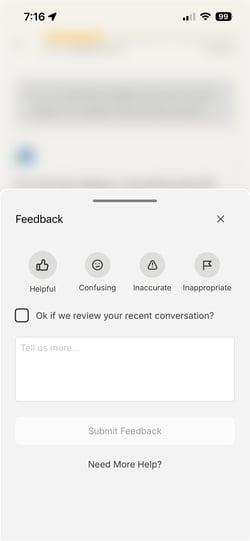
You can submit feedback about L.E.'s conversations with you by using the Feedback form during a learning session. This button is always available when in typical learning sessions (not visible during onboarding introduction to L.E), and the form sends us some details about your device and session for easier troubleshooting.
We may follow-up with you if we have additional questions.
Checking the checkbox allows us to review your past few messages with L.E. and enables us to better understand the issue you experienced without having to ask as many follow-up questions. Please check it whenever you are comfortable with providing these messages to our team to help us troubleshoot more easily.
You can also access this form by pressing and holding on a message from L.E.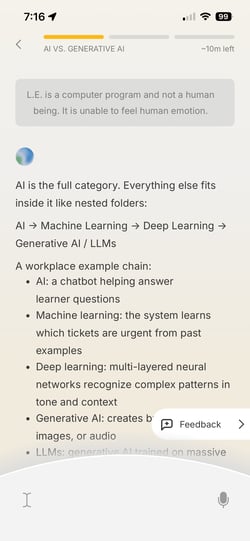
Off-App Bugs & Feedback Submission
Submit a Bug or Feedback Form
You can use the Submit a Bug or Feedback form to submit details on something that doesn't work as expected. Please provide as many details as you can to help us troubleshoot or understand your feedback best. We may follow-up with you if we have additional questions.
If you're submitting a bug that's preventing you from moving forward in the app, please also reach out to us at support@matterandspace.com to escalate the issue.
Pilot Learner Surveys + User Interview
Submitting your weekly surveys and signing up to participate in user interviews are some of the best ways to give us direct feedback. Check your email regularly for details on these opportunities as they become available.
Learner Support Outreach
You are always welcome to report bugs or send feedback to us by emailing support@matterandspace.com .
What details should I include in my bug or feedback form submission?
The more details you provide, the easier it is for our team to troubleshoot and dig into a bug or issue. At minimum, our team prefers to receive the following information so we can help most effectively:
- What happened versus what you expected to happen
- Where you were in the curriculum or in the app
- What smartphone device were you using when you experienced it
Other things that help us, but are not required:
- Screenshots that include the issue you experienced
- The OS version of your device
- The model of your device
The in-app feedback form will automatically send some device and session details to us. Checking the checkbox to provide your last five messages with L.E. will help us better understand where you were when this error occurred, so please check that box if you are comfortable with us reviewing it.
The off-app feedback form asks for specific details from you and gives you instructions on how to provide those details to us. If you've already provided those details previously, we have them on your account, so you don't need to resubmit them.