

Skip to content


Submit Bugs & Feedback

This page reviews the many methods of submitting bugs and feedback to the Matter and Space pilot team, both in-app and off-app.

Thank you in advance for helping us make the platform better through your reports. 


In-App Bugs & Feedback Submission

L.E. Feedback Form

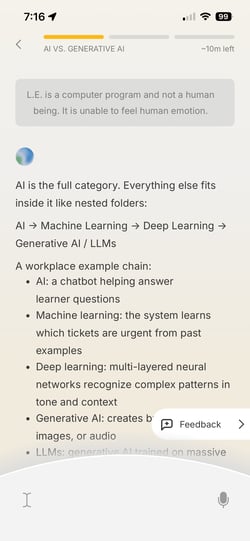
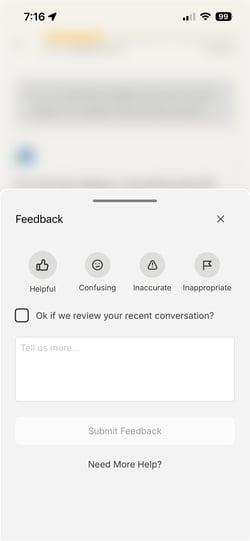
You can submit feedback about L.E.'s conversations with you by using the Feedback form during a learning session. This button is always available, and you can mark a category related to the feedback you're submitting.

You can also access this by pressing and holding on a message from L.E.

Checking the checkbox allows us to review your past few messages with L.E. so we can troubleshoot on our side. We may follow-up with you if we have additional questions.

IMG_3732. IMG_3734. IMG_3733


TestFlight Screenshots

You can take a screenshot at any point in the app and tap it when it appears in the bottom left. Scroll down a bit to find the "Share Beta Feedback" button, where you can fill out a form and attach additional screenshots to report an issue. 

We may follow-up with you if we have additional questions.

IMG_5764  IMG_3742 IMG_3738 IMG_3739

You may also access this feedback method by going to the LE-1 page in TestFlight and clicking the "Send Feedback" button. 

IMG_3753. IMG_3754


TestFlight Crash Reports

If the app crashes, the next time you open it, TestFlight will ask you to submit a crash report to the developers. Please send this report and include details about where you were and what you were doing in the app when the crash happened so we can investigate.

We may follow-up with you if we have additional questions.

Off-App Bugs & Feedback Submission

Submit a Bug or Feedback Form

You can use the Submit a Bug or Feedback form to submit details on something that doesn't work as expected. Please provide as many details as you can to help us troubleshoot or understand your feedback best. We may follow-up with you if we have additional questions.

If you're submitting a blocking bug that prevents you from moving forward in the app, please also reach out to us at support@matterandspace.com to escalate the issue.


Pilot Learner Surveys + User Interview

Submitting your weekly surveys and signing up to participate in user interviews are some of the best ways to give us direct feedback. Ensure you're checking your email for details on these opportunities as they are distributed.


Learner Support Outreach

You are always welcome to report bugs or send feedback to us by emailing support@matterandspace.com .