
iPhone instructions
From the home page, navigate to Settings > Health Accounts. On the page that pops up, you should see the "Connected" message and green indicator if the Apple Health access was granted successfully. To adjust what data is shared with the LE-1 app, press "Check Health Settings." This will open the Apple Health app to the Sharing page.
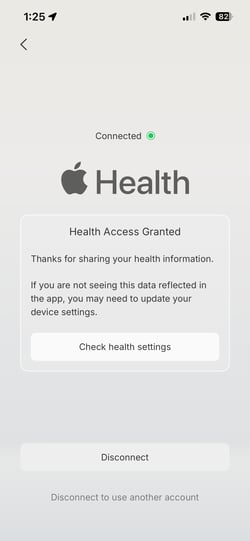
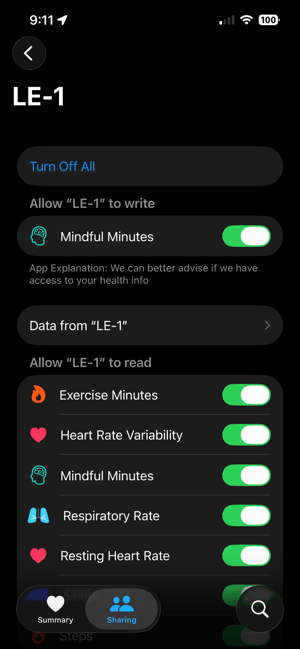
On the Sharing page, scroll down until you see a menu called Apps. Open that page, locate the LE-1 app, and tap it.
This is the page where you can toggle on or off any data that you share with the LE-1 app. If you're able to adjust the toggles on this page, this means that your connection between Apple Health and LE-1 was successful.
If you connected a Fitbit that you received from Matter and Space, there is an additional step you can take to check for a successful connection.
Open Google Health > Tap the Connections button (very top left) > Confirm the Fitbit shows as synced. This will let you confirm the Fitbit is synced to Google Health and pushing data.
From that same Connections page, tap Partner Apps > Apple Health. If you're able to adjust the toggles on this page, this means that your connection between Google Health and Apple Health was successful.
Android instructions
From the home page, navigate to Settings > Health Accounts. On the page that pops up, you should see the "Connected" message and green indicator if the Google Health access was granted successfully. To adjust what data is shared with the LE-1 app, press "Go to Settings." This will open the Health Connect page.
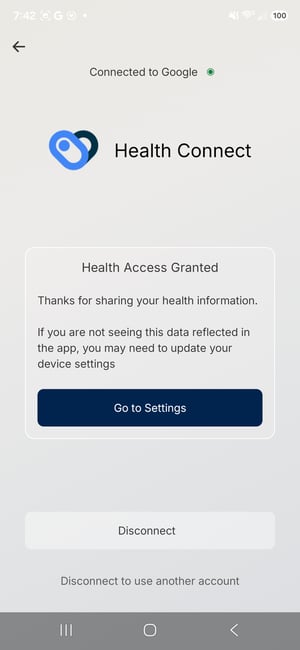
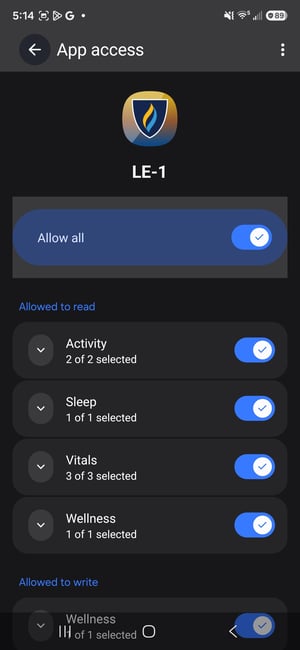
On the Health Connect page, locate the LE-1 app and tap it.
This is the page where you can toggle on or off any data that you share with the LE-1 app. If you're able to adjust the toggles on this page, this means that your connection was successful.
Why am I seeing "No Data" on my Physical Human Development dashboard?
See the Why am I seeing "No Data" on my Physical Human Development dashboard? article for help.
How to connect a wearable to the LE-1 app
Follow the instructions on the Getting Started: Connect Your Wearable page for details. Use the buttons at the top to navigate to the instructions for the smartphone device you have.